
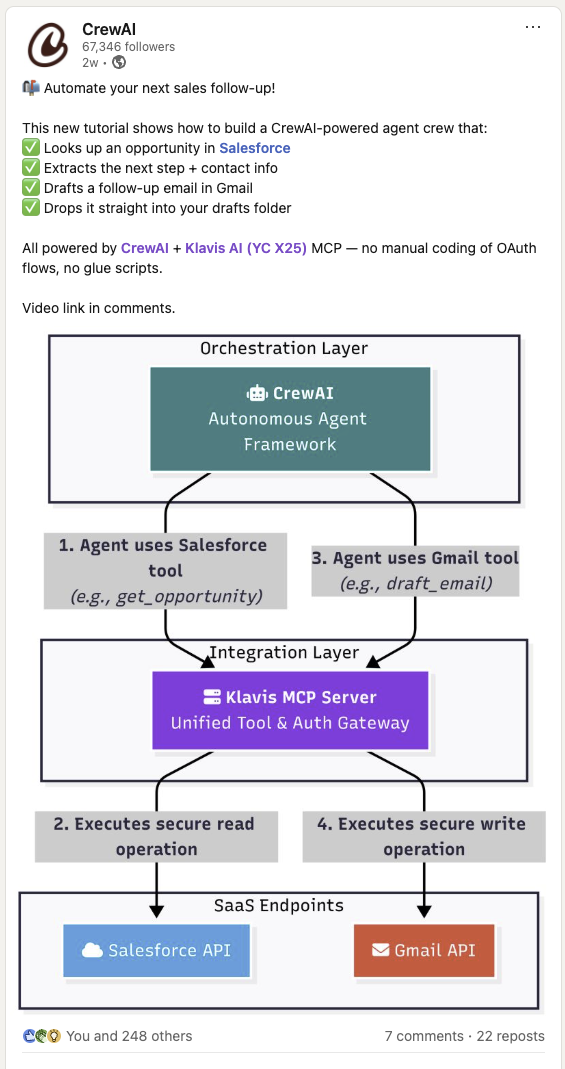
CrewAI has officially showcased their integration with Klavis AI in this LinkedIn post, demonstrating how to build powerful AI agent crews that can automate complex workflows across multiple platforms.
import os# Set environment variablesos.environ["OPENAI_API_KEY"] = "your-openai-api-key-here" # Replace with your actual OpenAI API keyos.environ["KLAVIS_API_KEY"] = "your-klavis-api-key-here" # Replace with your actual Klavis API key
// Set environment variables in your .env fileprocess.env.OPENAI_API_KEY = "your-openai-api-key-here"; // Replace with your actual OpenAI API keyprocess.env.KLAVIS_API_KEY = "your-klavis-api-key-here"; // Replace with your actual Klavis API key
CrewAI allows you to create specialized AI agent crews where each agent can have access to different MCP tools. This enables sophisticated multi-agent workflows that can:
Create MCP Instances: Set up connections to external services
Specialized Agents: Each agent focuses on specific tasks with relevant tools
Collaborative Workflows: Agents work together in sequential or parallel processes
Tool Discovery: Automatically discover available tools from MCP servers
Smart Coordination: CrewAI manages task dependencies and agent collaboration
Step 1 - Create Strata MCP Server with Gmail and Slack
from klavis import Klavisfrom klavis.types import McpServerName, ToolFormatimport webbrowserklavis_client = Klavis(api_key=os.getenv("KLAVIS_API_KEY"))response = klavis_client.mcp_server.create_strata_server( servers=[McpServerName.GMAIL, McpServerName.SLACK], user_id="1234")# Handle OAuth authorization for each servicesif response.oauth_urls: for server_name, oauth_url in response.oauth_urls.items(): webbrowser.open(oauth_url) print(f"Or please open this URL to complete {server_name} OAuth authorization: {oauth_url}")
const klavisClient = new KlavisClient({ apiKey: process.env.KLAVIS_API_KEY });const response = await klavisClient.mcpServer.createStrataServer({ servers: [Klavis.McpServerName.Gmail, Klavis.McpServerName.Slack], userId: "1234"});// Handle OAuth authorization for each servicesif (response.oauthUrls) { for (const [serverName, oauthUrl] of Object.entries(response.oauthUrls)) { window.open(oauthUrl); // Wait for user to complete OAuth await new Promise(resolve => { const input = prompt(`Press OK after completing ${serverName} OAuth authorization...`); resolve(input); }); }}
OAuth Authorization Required: The code above will open browser windows for each service. Click through the OAuth flow to authorize access to your accounts.
Step 2 - Create method to use MCP Server with Crew AI
This method handles multiple rounds of tool calls until a final response is ready, allowing the AI to chain tool executions for complex tasks.
import jsonfrom crewai import Agent, Task, Crew, Processfrom crewai_tools import MCPServerAdapterdef crew_with_mcp_server(mcp_server_url: str, user_query: str): klavis_server_params = [ { "url": mcp_server_url, "transport": "streamable-http" } ] with MCPServerAdapter(klavis_server_params) as all_mcp_tools: print(f"Available tools: {[tool.name for tool in all_mcp_tools]}") klavis_agent = Agent( role="Klavis Query Assistant", goal="Assist the user with their query using available tools", backstory="Expert at assisting users with their queries using available tools", tools=all_mcp_tools, verbose=False, llm="gpt-4o" ) klavis_task = Task( description=f"Answer the user's query: {user_query}", expected_output="Provide a detailed response to the user's query", agent=klavis_agent ) crew = Crew( agents = [klavis_agent], tasks = [klavis_task], process=Process.sequential, verbose=True ) result = crew.kickoff() return result
import { Agent, Task, Crew, Process } from 'crewai';import { MCPServerAdapter } from 'crewai-tools';async function crewWithMcpServer(mcpServerUrl: string, userQuery: string) { const klavisServerParams = [ { url: mcpServerUrl, transport: "streamable-http" } ]; const mcpAdapter = new MCPServerAdapter(klavisServerParams); const allMcpTools = await mcpAdapter.getTools(); console.log(`Available tools: ${allMcpTools.map(tool => tool.name)}`); const klavisAgent = new Agent({ role: "Klavis Query Assistant", goal: "Assist the user with their query using available tools", backstory: "Expert at assisting users with their queries using available tools", tools: allMcpTools, verbose: false, llm: "gpt-4o" }); const klavisTask = new Task({ description: `Answer the user's query: ${userQuery}`, expectedOutput: "Provide a detailed response to the user's query", agent: klavisAgent }); const crew = new Crew({ agents: [klavisAgent], tasks: [klavisTask], process: Process.Sequential, verbose: true }); const result = await crew.kickoff(); return result;}
result = crew_with_mcp_server( mcp_server_url=response.strata_server_url, user_query="Check my latest 5 emails and summarize them in a Slack message to #general")print(f"\nFinal Response: {result}")
result = await crewWithMcpServer( response.strataServerUrl, "Check my latest emails and summarize them in a Slack message to #updates");console.log(`\nFinal Response: ${result}`);
Perfect! You’ve integrated Crew with Strata MCP servers.
When using CrewAI with Klavis MCP servers, follow these security guidelines:
def create_secure_crew(): """Demonstrates secure MCP server integration with CrewAI""" # 1. Use environment variables for sensitive data api_key = os.getenv("KLAVIS_API_KEY") if not api_key: raise ValueError("KLAVIS_API_KEY environment variable is required") # 2. Validate server URLs (use HTTPS in production) server_params = [{ "url": server_instance.server_url, "transport": "streamable-http" }] # 3. Always use context managers for proper resource cleanup try: with MCPServerAdapter(server_params) as mcp_tools: # 4. Validate available tools before use if not mcp_tools: raise ValueError("No tools available from MCP server") print(f"✅ Securely connected with {len(mcp_tools)} tools") # 5. Create agents with limited scope agent = Agent( role="Data Analyst", goal="Analyze data within defined parameters", backstory="You operate within strict security guidelines.", tools=mcp_tools, reasoning=False, # Disable for production verbose=False # Disable verbose logging in production ) return agent except Exception as e: print(f"🔒 Security check failed: {e}") return None# Example usagesecure_agent = create_secure_crew()if secure_agent: print("✅ Secure crew created successfully")
function createSecureCrew() { // 1. Use environment variables for sensitive data const apiKey = process.env.KLAVIS_API_KEY; if (!apiKey) { throw new Error("KLAVIS_API_KEY environment variable is required"); } // 2. Validate server URLs (use HTTPS in production) const serverParams = [{ url: serverInstance.serverUrl, transport: "streamable-http" }]; // 3. Always handle errors properly try { // 4. Validate available tools before use const mcpTools = new MCPServerAdapter(serverParams); if (!mcpTools) { throw new Error("No tools available from MCP server"); } console.log(`✅ Securely connected with tools`); // 5. Create agents with limited scope const agent = new Agent({ role: "Data Analyst", goal: "Analyze data within defined parameters", backstory: "You operate within strict security guidelines.", tools: mcpTools, reasoning: false, // Disable for production verbose: false // Disable verbose logging in production }); return agent; } catch (error) { console.error(`🔒 Security check failed: ${error}`); return null; }}// Example usageconst secureAgent = createSecureCrew();if (secureAgent) { console.log("✅ Secure crew created successfully");}